Answer when you are ready, not when it arrives.
Three marks for mail you cannot deal with right now, each meaning something different. Focus & Reply lines up every answer you owe, and one click follows up on mail you sent.
Three kinds of not now
“I’ll deal with it later” means different things. Sometimes you owe someone an answer. Sometimes you just need the details close at hand. Sometimes you want a message out of sight until a particular day. Kistrl gives each of these its own mark, so later never turns into a pile. The marks are independent, and a conversation can carry more than one.
Reply later
Reply later records an answer you owe. Everything waiting on you collects in one queue, and Focus & Reply works through it.
Set aside
Set aside keeps a conversation close for reference: a ticket, an address, details you will need again. Find everything you set aside from the command palette, and remove the mark when you are done with it.
Bubble up
Bubble up brings a conversation back to the top of your Inbox at a time you pick. Until then it is out of your way. See what is scheduled from the command palette, and cancel a bubble whenever plans change.
Focus & Reply
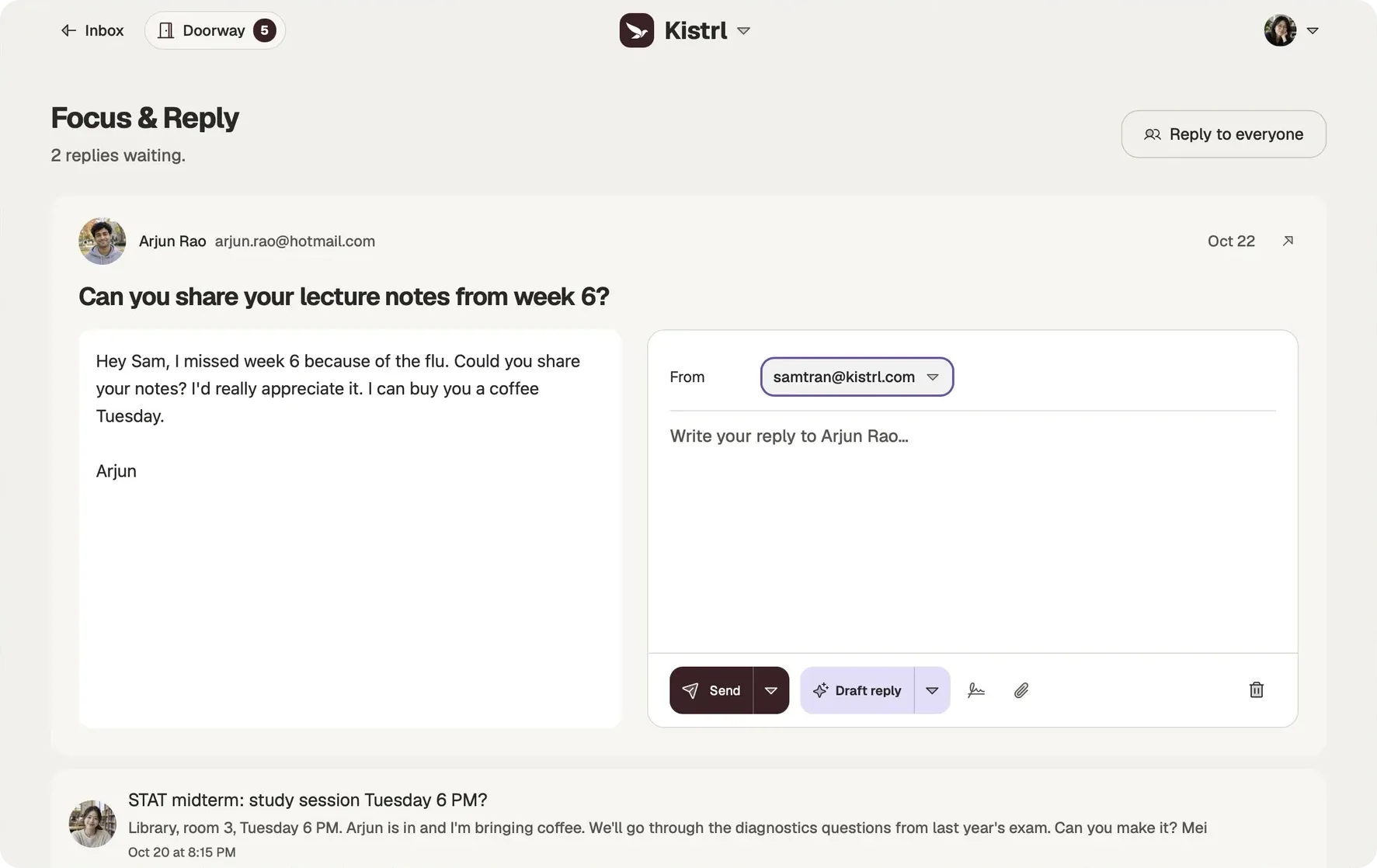
Focus & Reply gathers every conversation you marked Reply later, along with the reply drafts you saved. Each one shows the original on one side and your answer on the other, so you work down the list without opening and closing conversations. Replies save as you type, and sending includes an undo window.
Open it from the command palette, or press G then R.
Follow up on mail you sent
Wrote to someone and heard nothing back? Open the conversation in Sent and choose Follow up. The reply opens right there, to the same people and under the same subject, so a nudge takes seconds.
Reminder if no reply
Asked a question and want to know if it goes unanswered? In the Send options, choose Remind me if no reply: in 3 days, in a week, in 2 weeks, or a date you pick. The pill beside Send shows the reminder, and its cross removes it.
If nobody has answered by then, at your reminder time (9:00 unless you change it), the conversation returns to your Inbox under No reply yet and Kistrl notifies you. Open it to Follow up, choose Remind me again for tomorrow, in 3 days or next week, or choose No reply needed. Any answer in the conversation cancels the reminder, and so does a follow-up you send. A message that bounces or never leaves cancels it too.
Set a default under Settings → Sending → Reminder if no reply: off, 3 days, a week or 2 weeks. With AI turned on, Kistrl can also offer a reminder when you press Send on an email that asks a question. It looks at the new words of that one email, once, and only then. Turn this off in the same place.
Kept safe, kept close
Marked conversations are never removed by recycling, and they stay on your device for offline reading, so the things you promised to come back to are always there when you do.
Give the answers you owe their own time.
Arjun asked Sam for lecture notes. Mei suggested a study session. Both conversations are already marked Reply later, ready for a deliberate reply session.
Reply later for an answer owed.
Mark a conversation when someone is waiting on you. It joins Focus & Reply.
Set aside for a detail to keep.
Keep financial-aid instructions close without treating them as an answer you owe.
Bubble up for a chosen time.
Choose when an eligible Inbox conversation should return. The three marks are independent.
From Reply later to a reply
Questions
What is the difference between Reply later and Set aside?
Reply later records an answer you owe and adds the conversation to Focus & Reply. Set aside keeps a conversation close for reference, like a ticket or an address you will need again.
How does Bubble up work?
Pick a time on an Inbox conversation, and it returns to your Inbox then. Choose Cancel Bubble up to clear the schedule.
Can a conversation have more than one mark?
Yes. The marks are independent, so a conversation can be set aside and waiting for a reply at the same time.
How do I follow up on an email nobody answered?
Open the conversation in Sent and choose Follow up. The reply opens in place, addressed to the same people, under the same subject.
How do I get a reminder when nobody answers?
Open the Send options and choose Remind me if no reply, then pick a number of days or a date. If nobody has answered by then, the conversation returns to your Inbox and Kistrl tells you.
What counts as an answer?
Any message that arrives in the same conversation from someone other than you. Automatic replies such as out-of-office, delivery failures and your own copies do not count.
Is marked mail ever recycled?
No. Conversations marked Reply later, set aside or waiting to bubble up are never removed by recycling, and they are kept on your device for offline reading.
Further reading
- Inbox zero without the daily effortInbox zero fails when it depends on a decision for every message, every day. Decide once for each sender, keep reading and records out of the inbox, and give "later" a place, and the inbox reaches zero with little work.
- Reply later, set aside or snooze: three kinds of "not now"Leaving a message unread is how most people say "later". It works until it does not. Naming what kind of later you mean keeps nothing from slipping.
Start your 30-day free trial
Pick a username and it becomes your Kistrl address. No card needed.