A calendar that counts down to what matters.
Events in your time zone, countdowns to the days that matter, tasks planned straight onto the grid, time you track, days away that answer your mail, and the holidays and feeds you follow.
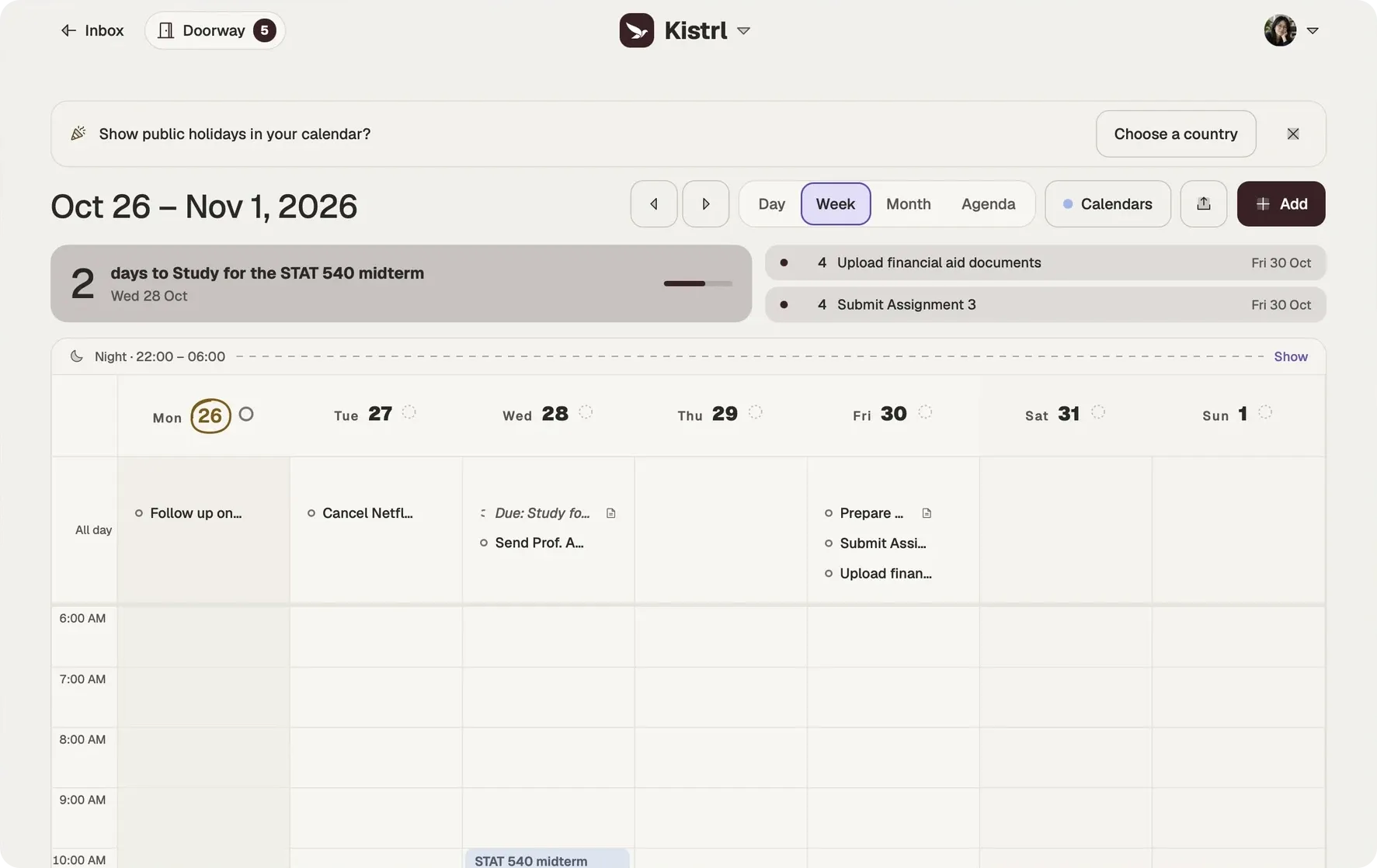
Countdowns
Some days matter more than others: a visa renewal, a launch, a wedding. Give an event or a task deadline a countdown, starting 7, 14, 30, 60, 90, 180 or 365 days ahead. It joins the countdown strip above the calendar, “5 days to Renew the visa”, with a bar that fills as the day nears, and the days leading up to it grow stronger in the grid. You decide which deadlines are big; Kistrl never ranks them for you.
Tasks on the calendar
Drop a task onto a day to plan it, or onto the grid to give it a time block, and resize the block to fit. A plan is a soft intention: if the day passes, the task slips back quietly, with nothing to clean up. When a task needs a real slot, Make it an event opens the event form with its title, details and time already filled in.
Tracked time
Start a timer from a task, or from the Day view, and stop it when you are done. Ticking a task off stops its timer. Tracked time shows where the days went, by day, and you can add a record you did not time. Nothing compares estimates with actuals, because nothing asks you for estimates.
Away and automatic replies
Plan the days you are away. The calendar shows them, and mail from people can be answered for you until you are back. The reply is plain text, marked as automatic so that other mail systems do not answer it, and it never quotes the message it replies to.
Holidays and subscriptions
Add the public holidays of a country, or just its national ones, and they show as named days instead of crowding the grid. Subscribe to any public or secret HTTPS calendar; subscriptions are read-only and refresh every 30 minutes. Import an .ics file and review its events first: importing never sends an invitation or RSVP.
Share your calendar
Create a secret feed link for any calendar so another app can subscribe to it. Replace or revoke a link at any time, and subscribers lose access.
In your time
Events are shown in your profile time zone, picked from a world map if you like. With AI assistance on, new events can get an activity icon suggested from their title; pick your own to replace it.
See the week before agreeing to another time.
Sam’s thesis meeting and interview originally overlap. The Inbox contains an update moving the interview to Friday, ready for Sam to review.
See the commitments.
Put appointments and work in the context of the rest of the week.
Check the update.
Read the new invitation before changing a commitment.
Choose a useful plan.
Make time for the work around the appointments, with deadlines still distinct.
Review a changed appointment
Questions
What is a countdown?
An event or a task deadline can count down. Choose how early it starts, from 7 days to a year; it then shows above the calendar with the days left and a bar that fills as the day nears.
Can Kistrl answer my mail while I am away?
Yes. Plan the days you are away; the calendar shows them, and mail from people can be answered for you until you are back.
Can I subscribe to other calendars?
Yes. Add a public or secret HTTPS calendar address. Subscriptions are read-only and refresh every 30 minutes.
Does importing a calendar file send invitations?
No. Importing an .ics file never sends an invitation or RSVP, and you review the events before adding them.
Your calendar, right beside your mail.
Pick a username and it becomes your Kistrl address. No card needed.