Choose what an email can load.
Every message opens in its own sandboxed frame. Choose whether remote content loads directly, through Kistrl Proxy, or only when you ask.
A message is a document from someone you may not know
An HTML email can carry scripts, forms and links to resources on the sender’s servers. Opening it is a little like opening a web page someone else wrote. Kistrl treats it that way, without asking you to think about it.
Every message is sealed
Each message opens in its own sandboxed frame. Inside it, a message cannot run scripts, submit forms or load external stylesheets. This applies to every message from every sender.
Images on your terms
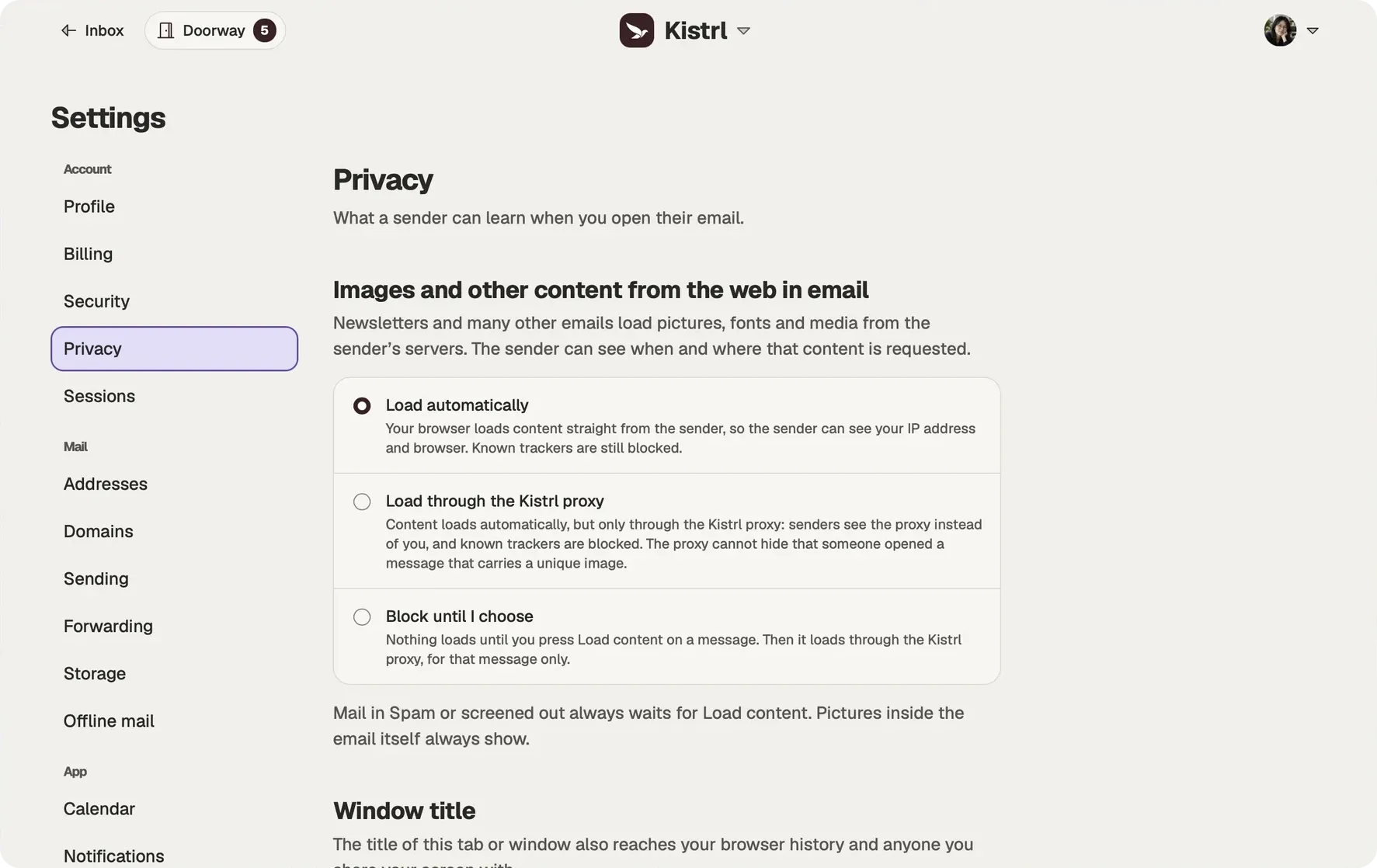
Many messages point to images, fonts and media stored elsewhere. In Settings → Privacy, choose Load automatically, Load through the Kistrl proxy, or Block until I choose. Direct loading contacts the sender’s servers from your browser. Proxy loading hides your IP address and browser details from those servers. Blocking waits for Load content, then uses the proxy for that message. Spam and screened-out mail always wait for that choice.
Known tracking resources stay blocked. The proxy keeps a temporary cache for up to 24 hours, so a cached image does not reach the sender again.
Addresses that protect your own
Give each shop or sign-up its own privacy address, a random address that does not reveal your username. Block it the day it starts getting spam, and your own address stays yours.
A sign-in that stays yours
Add an authenticator app and recovery codes to your account. Signing in then asks for your password and a code.
Choose what loads when you open an email.
The Privacy screen offers three choices. Pick the behavior you want rather than assuming every message loads the same way.
Load automatically.
Your browser contacts the sender’s servers. Known trackers are still blocked.
Load through the proxy.
Senders see Kistrl’s proxy instead of your browser and IP address. A unique image can still reveal an open.
Block until you choose.
Remote content waits for Load content, then loads through the proxy for that message.
See external-content choices
Questions
Can an email run scripts in Kistrl?
No. Each message opens in its own sandboxed frame, where it cannot run scripts, submit forms or load external stylesheets.
What does Kistrl Proxy hide from senders?
When proxy loading is selected, your browser contacts the proxy instead of the sender’s servers. Kistrl does not forward your IP address, browser details, cookies or referrer.
Does the proxy stop every tracking pixel?
Known tracking resources stay blocked. An unknown tracker or a recipient-specific link can still reveal the time of a request when the resource is not cached, so the proxy reduces what a sender learns but cannot guarantee every open is hidden.
How do I protect my sign-in?
Turn on two-factor authentication with an authenticator app, and keep your recovery codes somewhere outside your mailbox.
Start your 30-day free trial
Pick a username and it becomes your Kistrl address. No card needed.